
Recognize a street
Use road markings, shop names, and neighboring buildings together. A readable sign is more useful than a tightly cropped subject.
Upload a picture and this AI location finder suggests where it was taken, using the signs, buildings, roads, and landscape it shows. Check the suggested place on a map, or inspect the Lisbon example first. No GPS tags needed.
Try a free location check. Usage limits apply; sign-in may be required. Your photo stays attached.
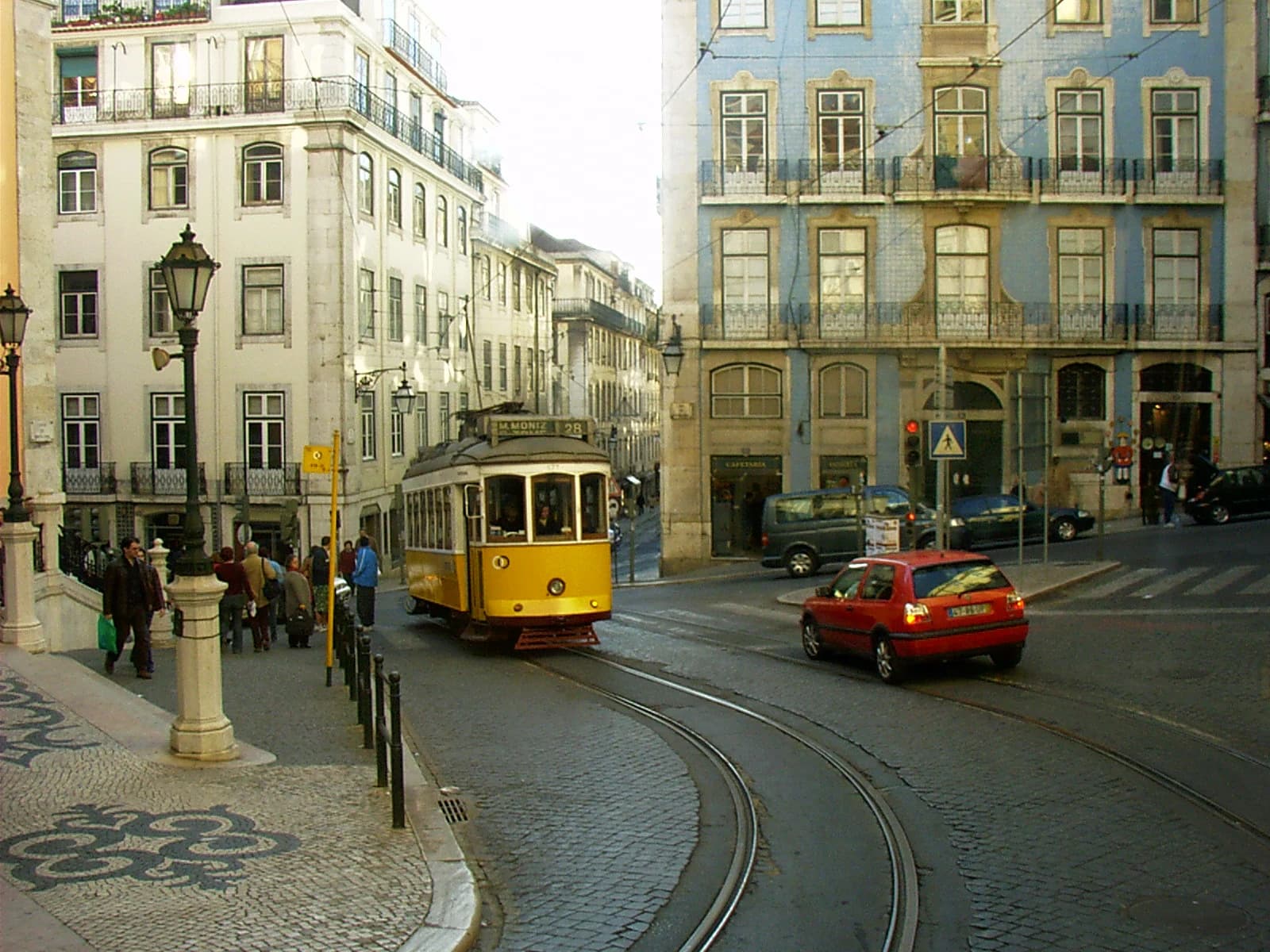
The yellow tram's route display is a lead to investigate, not enough to establish the camera position. Open the walkthrough to inspect the other visible clues.
Inspect this photo's cluesPhoto: Mdiagom · CC BY-SA 3.0 · Converted to WebP; no crop.
Start with a free estimate. See whether the scene agrees, then decide if this photo needs a closer look.
Choose a photo with buildings, signs, roads, or terrain. GPS tags are not required. The upload tool shows your current free allowance or sign-in step.
See the estimate on a map. Compare the bridge, street layout, signs, or neighboring buildings with your photo.
Open your result in the workspace. Investigate further with a one-time deeper search, or choose a monthly plan for more searches.
Free with an account. No card needed. Free checks have monthly limits.
Use road markings, shop names, and neighboring buildings together. A readable sign is more useful than a tightly cropped subject.
Start with the coastline, bridge, skyline, or terrain in a saved photo. Compare the suggested place with the original view.
A screenshot or downloaded copy may have no GPS data. Going from image to location then depends on what is visible, and the finder uses those surroundings to suggest where to look.
As a photo locator, the free scan returns a suggested place and map when the image contains usable clues. It is a starting point for checking the scene. A city estimate does not establish a street address or the camera's exact position.
Compare photo search methodsA full street scene gives more to work with than a tight crop. Look for a readable road sign, business name, or intersection. Generic interiors and blurry close-ups can remain unresolved.
This AI image location finder does not need GPS tags. It looks at the same things a person checking the picture would, all at once, and weighs them against each other.
Street signs, shop names, posters and house numbers. The script alone often narrows the country, and a readable name can narrow it to a street.
Lane markings, kerb colours, road signs and which side of the road traffic uses. These follow national rules, so they are strong regional clues.
Rooflines, materials, window shapes and how streets are laid out. Old town centres, suburbs and new developments each look different from country to country.
Coastline, mountains, soil colour and the trees and crops in view. These help most outside cities, where there is little writing to read.
Power poles, street lights, bollards and bus stops are made to local designs and are easy to overlook, which makes them useful.
Start with the evidence available: saved GPS data, an online source, visible scene clues, or a candidate place to check.
Readable signs, road markings, junctions, and neighboring buildings give you independent details to check. Keep them in the frame instead of cropping tightly around a subject.
Often the quickest to place, because a distinctive structure or skyline is recognisable. Check that the angle you see matches the suggested place.
Useful for the region, less so for the exact spot. Terrain, plants and the shape of a coast point to an area, and there is little writing to narrow it further.
A plain room may contain no distinctive location clues. A view through a window, readable signage, or another photo of the surroundings can provide more context. It may still remain unresolved.
Weaker. A crop that removes signs and the horizon removes the clues. Use the widest, brightest version you have.
An estimate is a place to look, not a verdict. An exact location is not guaranteed.
A country, a city, and a camera position are different answers. A map pin marks a suggested place to inspect. A radius or a high confidence score is not independent proof of accuracy.
In the Lisbon sample, compare the curve in the tram tracks, the tiled corner facade, and the side street together. A yellow tram by itself is not enough to confirm the viewpoint.
Check whether the road bends the wrong way, the building order differs, or a sign conflicts with the suggested country. Where alternatives are available, apply the same checks to each. Keep a contradiction visible instead of forcing a match.
If you cannot line up the scene with reference imagery, treat the location as unresolved. Try a wider image or another frame with more surroundings. A deeper analysis may help investigate candidates, but payment does not guarantee a better or exact location.
Placing an old holiday photo or a picture a friend sent.
See worked examplesChecking that a listing photo shows the place it claims.
Verify a real estate photoVerifying where user-generated media was taken before publishing.
Verifying photo locations for reportingDocumenting how a location was reached, for an open-source case file.
Image OSINT for investigatorsOceanir answers where an image was taken, never who is in it. It has no face recognition. Read the product boundaries.
Each tool answers a slightly different question. These pages set Oceanir beside the ones people ask about most.
Written by the Oceanir team. Last reviewed 2026-10-28.
When you want to go further
A deeper search examines possible locations and the clues for and against them. Your free result is the starting point.
Try your photo firstA detailed D3 search uses 10 credits. Monthly plans renew until canceled in Settings. An exact location is not guaranteed. Prices in USD.
Compare plans and credit detailsWhat the tool can do, what it costs, and what makes a photo easier to place.
Yes. Oceanir uses visible signs, buildings, roads, and terrain to suggest a location. A screenshot or shared photo can still contain these clues even when GPS tags are missing. If you have the original file, checking its GPS tags is a useful first step.
You can try photos from different countries. Readable signs, distinctive buildings, road layouts, and terrain help more than the country alone. Some scenes support only a broad area or remain unresolved; no tool can guarantee a precise location from every image.
A successful basic check suggests a place to investigate and shows it on a map. The answer may be broad or unresolved. Free with an account. No card needed. Free checks have monthly limits. The upload tool shows your current access. A confidence score is a model estimate, not proof of a correct location.
One deeper photo check is a single payment, without a subscription; you see its price before paying. Starter is $10/month for 100 credits, and Pro is $29/month for 3000 credits. A detailed D3 search uses 10 credits. Monthly plans renew until canceled in Settings. Review the free result before choosing.
No. A deeper search examines more clues and possible locations, but it can still be inconclusive. Dark scenes, generic interiors, and tight crops may not contain enough evidence. Compare signs, road layouts, and neighboring buildings before accepting a match.
Choose a clear outdoor scene with street signs, storefronts, buildings, bridges, or distinctive terrain. Keep the surroundings visible. Upload a JPG, PNG, or WebP up to 25 MB. For a video, save a clear frame and upload it as an image.