Reverse image search is the most used tool in image OSINT and one of the most misused. People run one search, find nothing, and decide the image cannot be traced. Or they find a match with a confident caption and treat the caption as the answer. Both mistakes come from mixing up two different questions.
The short version
Search the whole frame and each crop on more than one engine. Search any readable text as text. Treat every caption as a claim. A miss is normal for new images, and it means you move to the scene, not that the image cannot be placed.
01
Two questions, two methods
| Reverse image search | Geolocation | |
|---|---|---|
| Question it answers | Where else has this picture appeared? | Where was this picture taken? |
| Works from | Matching the image against an index of other images. | The scene itself: signs, roads, buildings, terrain. |
| A good result | An earlier copy, a higher-resolution original, or a duplicate with context. | A place you can confirm against imagery. |
| Fails when | The image was never published, or is new, cropped, edited or AI generated. | The scene has few fixed features, or looks like thousands of other places. |
| Tells you about | The picture and its history. | The place. |
Run reverse search first because it is cheap and sometimes settles the whole question. When it does not, you have lost nothing, and you know that locating the scene is the next step.
02
How to run a reverse image search properly
- Search the whole frame. Use the cleanest copy you have, not a screenshot with interface around it.
- Search each distinct crop. A building, a sign, a statue, a slice of skyline. Engines match what they can see, and a crop removes noise that hides a match.
- Remove overlays. Watermarks, captions, stickers and borders can stop a match. Crop them off.
- Try more than one engine. They index different slices of the web, and a miss on one means little.
- Try variations. Mirror the image, change the contrast, or search a frame earlier or later if it came from a video.
- Sort by date where you can. The oldest copy matters more than the most popular one.
03
What each engine tends to be good for
Analysts settle into habits, and the differences are real even though they shift over time. Test on images where you already know the answer before you rely on any of this.
| Engine | Often strongest at | Worth knowing |
|---|---|---|
| Google Lens | Landmarks, products and text in the image. | Good on well-photographed places, weaker on ordinary streets. |
| Yandex Images | Buildings and streetscapes, especially outside North America. | Often finds visually similar scenes other engines miss. |
| TinEye | Exact and near-exact copies, and finding the oldest upload. | A miss does not mean the image is new. |
| Bing Visual Search | A second opinion. | Overlaps with the others, but not completely. |
Field observations, not guarantees. Each engine changes its index and features without notice, so say which engine you used and when.
04
Reading the results
- An earlier upload than the one you were given. Often the most valuable result. If a photo claimed to show last week's event appeared three years ago, you have your answer on the date.
- A higher-resolution copy. More detail means more anchors. Look for the original poster.
- A different photo of the same place. Not a match for your picture, but a location lead and a second view to compare.
- Reposts with captions. Each caption is a claim. Check whether they agree with each other and trace them to the earliest source.
- Lookalikes. Stock photos, AI-generated images and similar-looking places produce confident wrong matches.
05
How an earlier copy changes your conclusion
| What you find | What it means | Next step |
|---|---|---|
| A copy that predates the claimed date | The claim about when is wrong, or the image is being recycled. | Find the earliest copy and its source. Report the date you can show, not a guess about motive. |
| The same image with a different location caption | Someone has relabelled it, or the first caption is wrong. | Ignore both captions and locate the scene yourself. |
| The same image at higher resolution | Your copy is a re-encoded version. | Use the better file for anchors, and record which file you analyzed. |
| A different photo of the same place | A location lead, not a confirmation of your image. | Compare fixed features between the two photos. |
| The same scene with a crop, edit or overlay | Your copy has been changed. | Work from the least edited copy and note the differences. |
| Nothing | The normal case for new or private images. | Move to the scene. |
06
Search the text before the image
Writing in a photo is often the fastest route to a place, and search engines handle text far better than they handle pictures. A few readable words, a phone prefix or a route number can name the place outright.
| If the image shows | Search for | Where |
|---|---|---|
| A fragment of an inscription | The letters as an exact phrase, in the original script | A general search engine, then a map or an archive |
| A shop or business name | The name with a likely city, or the name alone in a map search | Map search, then street-level imagery |
| A phone number or area code | The number, and the area code on its own | A general search engine. Area codes narrow a region. |
| A bus, tram or train route number | The route number with a city or transit agency | Transit maps and agency sites |
| A street name or house number | The name on a map, then the number along that street | Map search and street-level imagery |
| A brand sold regionally | The brand, in the language on the packaging | The brand's store locator or regional site |
| A web address or handle on a sign or vehicle | The address typed directly | A browser, then the page's own contact details |
Search in the language on the sign. A transliterated name often finds nothing that the original script finds. If you cannot read the script, copy the characters rather than retyping them, and use a translation tool to check what you copied.
07
One night street, text first
A crowded street at night, packed with signs. It could be almost anywhere in Japan, which is the problem. Here is how readable text and one fixed structure take it further, and where the evidence stops. It is a Creative Commons photograph from Wikimedia Commons, so you can check each step.
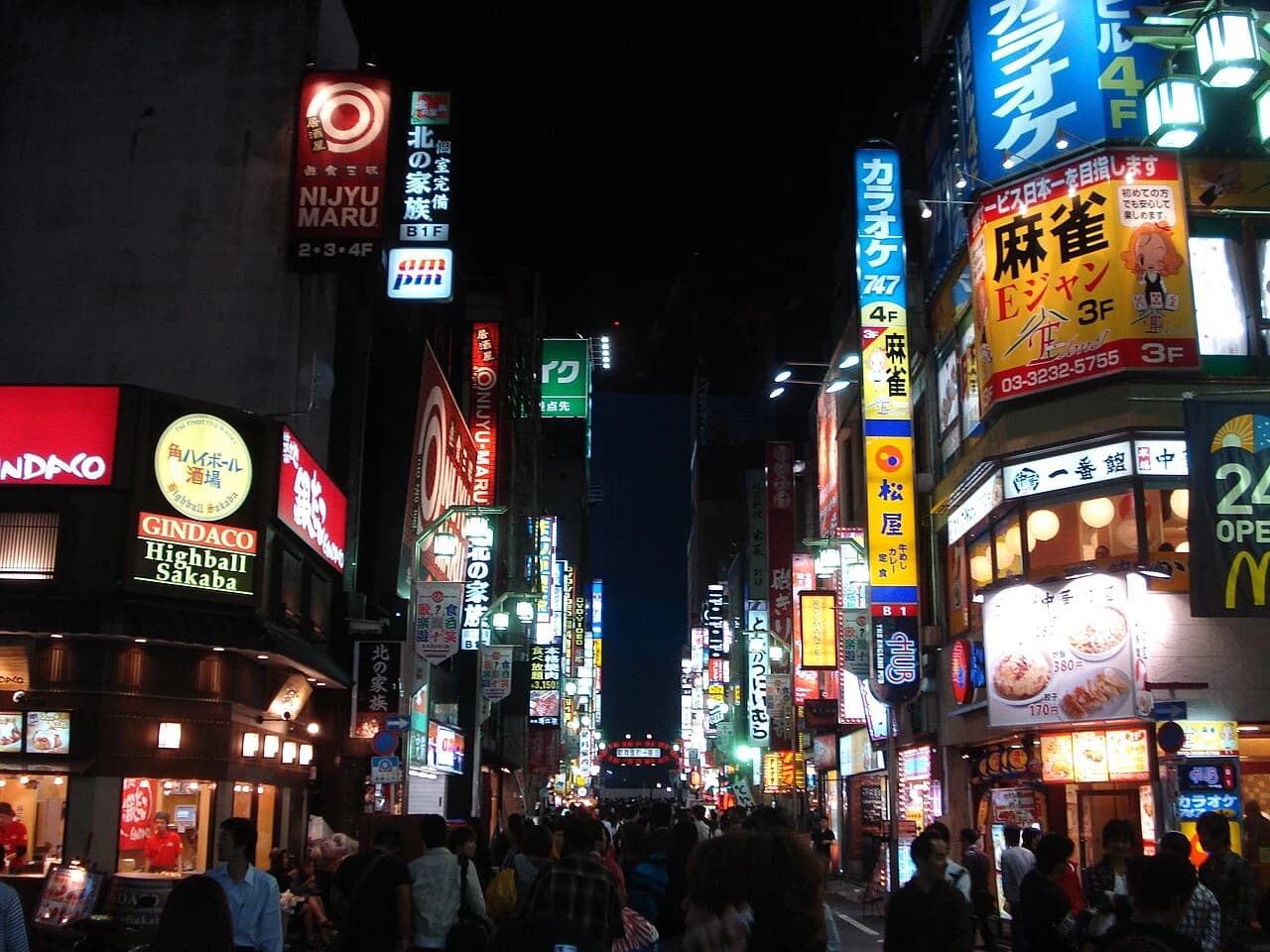
Photo: Carles Tomás Martí · CC BY 2.0 · Wikimedia Commons · Resized and converted to WebP; no crop.
Markers added by Oceanir. Open the source to check every step yourself.
A phone number on a sign
A yellow sign carries a landline number that starts with 03. Japanese area codes name a region, and 03 is the code for central Tokyo. A number is exactly what to search, together with the business name beside it.
A lit arch at the end of the street
Far down the street a red arch spans the road. Unlike the signs, it is a fixed structure, so it is the best thing here to match on a map. The source's categories name Kabukichō Ichiban-gai at night.
Chain names
GINDACO Highball Sakaba, Matsuya, am/pm and McDonald's all appear. Chains repeat across a country, so one on its own proves nothing. Several together in one narrow street are worth checking against a map of the area.
Prices in yen
A food sign shows 380円 and 170円. The yen sign confirms Japan and nothing narrower.
The investigation log
| Step | What was checked | Result |
|---|---|---|
| Read the scene | Text, structures and prices | Japanese script and yen prices put this in Japan. The phone prefix points to Tokyo. One fixed structure, the arch, is worth matching. |
| Search the text | The business names and the area code | Search the shop names together, in their own script, not one at a time. Each chain returns thousands of places, but several together in one street return far fewer. |
| Check the source | The Commons categories and the file's embedded coordinates | They name Shinjuku and Kabukichō Ichiban-gai, and the file carries coordinates of 35°41′37.8″ N, 139°42′12.6″ E. That is a lead to test. Embedded coordinates can be wrong or edited. |
| Compare with imagery | The arch, the street width and the order of the buildings | Match them against dated street-level views of the candidate street, going back to 2009. Signs change quickly on streets like this, so the arch and the layout matter more than any storefront. |
| Document | Everything above | Save the source address, the retrieval date, the marked image and this log, so someone else can repeat each step. |
This is what a log for this photo looks like. Misses belong in it too.
What we can say, and how sure
| Level | Status | Note |
|---|---|---|
| Country | Strong | Japan. Japanese script, yen prices and a Japanese phone number format agree. |
| City | Strong | Tokyo. The 03 prefix and the source agree. |
| District and street | Lead | Shinjuku and Kabukichō Ichiban-gai, from the source's categories. Needs a match to dated imagery. |
| Camera position | Lead | The file's embedded coordinates are a lead to test, not an answer. |
| Date | Lead | 11 October 2009, from the file's own metadata as shown on the source page. |
The lesson
Chains and neon make a street look generic. The phone prefix, the yen prices and one fixed structure do the work, and the source's coordinates are a lead to test, not an answer.
08
When search finds nothing
Most photos that reach an investigation have never been indexed, because they are new, private or from a closed platform. No match is the normal case. Move to the scene.
- Read the anchors and rank them.
- Search by place instead of by picture. Look up sign names on a map, search distinctive street furniture, or query OpenStreetMap data for a combination of features, such as a roundabout beside a rail line.
- Use an AI estimate to get a ranked shortlist of places to test.
- Compare each candidate against satellite and street-level imagery.
09
Search by place, not only by picture
Once you have a candidate, flip the method. Look for photos of the candidate place and compare them to yours. Street-level imagery, community photo maps and local news archives all help. You are no longer asking whether your picture exists elsewhere. You are asking whether the place you suspect looks like your picture, which you can answer by comparison.
10
Privacy and safety when you upload
Every reverse search uploads your image to someone else's service. Before you do, think about the image. If it came from a source who could be endangered by its exposure, or it is material you are not permitted to share, do not upload it to tools whose retention you do not know. Check how long a tool keeps uploads and whether you can delete them. Oceanir lets you turn saved history off for your account, and it answers where an image was taken, never who is in it.
11
A simple order of work
- Preserve the file and record the source.
- Reverse search the frame and the crops.
- If you find an earlier copy, trace the earliest source and test its caption.
- If you find nothing, locate the scene.
- Confirm any candidate against imagery you can cite, and write down the chain.
12
Questions
What is OSINT image search?
Using image search engines and open sources to find where else a picture has appeared, who published it first and what context surrounds it. It is usually the first step in checking a photo, and it is a different job from working out where the photo was taken.
Can reverse image search find where a photo was taken?
Sometimes, when a copy of the image or another photo of the same place is indexed with a caption or location. It cannot tell you the location of an image that has never been published. That takes geolocation from the scene.
Why does reverse search miss my image?
The image may be new, cropped, filtered or from a platform engines cannot crawl. Try crops, other engines and variations before you give up, and expect a miss on genuinely new images.